How to Convert an MP3 File into Professional Sheet Music
If you already have your song saved as an MP3 file, you can upload it directly to our Instant Quote tool—no link sharing required.
This is ideal for:
- Original compositions
- Studio demos
- Rehearsal recordings
- Private files
Step 1: Go to the Homepage
Open the Tunescribers homepage and locate the Instant Quote tool.
Step 2: Upload Your MP3 File
- Select the upload option.
- Choose your MP3 file from your device.
- Wait for it to upload and process.
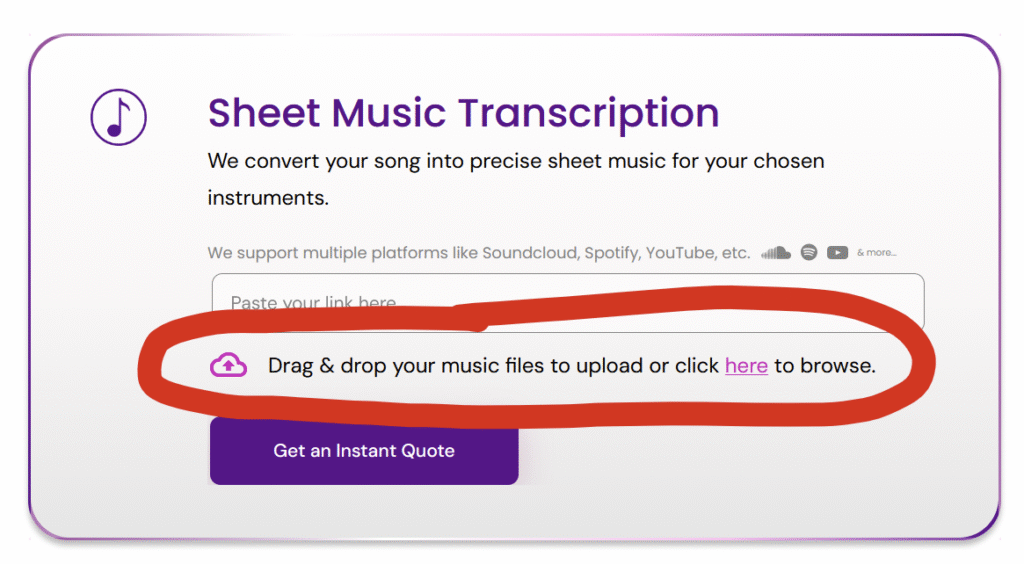
On Mobile
Tap the upload area and choose your file from:
- Files app
- Cloud storage
- Device storage
Step 3: Select Your Requirements
Choose your:
- Instrumentation
- Notation preference (e.g. tablature, lyrics, chords)
- Key
- Difficulty level
- Score and/or parts
- Any additional formats (Sibelius, MuseScore, Dorico, MIDI, etc.)
You’ll receive an instant price based on your exact requirements.
Step 4: Receive Your Sheet Music
Our professional musicians will transcribe your MP3 and deliver clean, publication-quality notation.
Rush delivery available in as little as 2 days.
FAQ
Do you use automatic software?
No—all transcriptions are completed by professional musicians.
Is WAV supported?
Yes—WAV files can also be uploaded directly.
Upload your MP3 to the Instant Quote tool and get started today.
Don’t have an MP3, but have a link to the song online?
If you don’t have an audio file of the song, we also support:
- YouTube videos
- Spotify tracks
- SoundCloud songs
- Facebook videos & Reels
- TikTok videos
- Google Drive audio files
- Dropbox audio files
See our full guide:
How to Turn Any Online Song into Sheet Music