Categories
testing category

More Ways to Turn Your Favourite Music Into Sheet Music

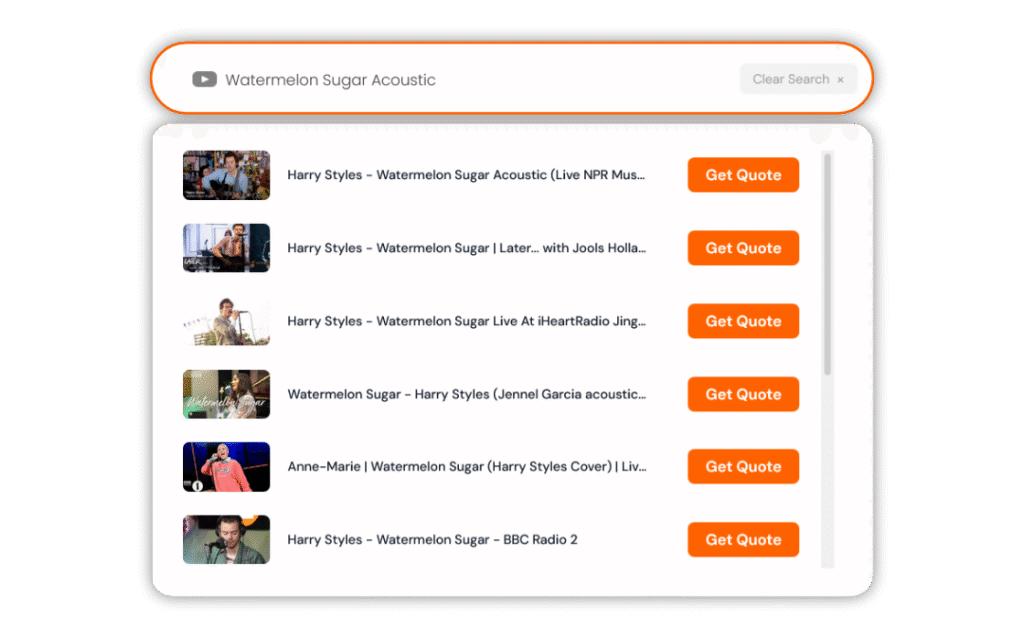
We’ve just expanded the list of platforms compatible with our Instant Quote tool—meaning it’s now even easier to turn the music you love into professionally engraved sheet music.

Whether your track is on social media, in the cloud, or already saved as an audio file, you can now generate an instant quote in seconds.

Newly Supported Sources

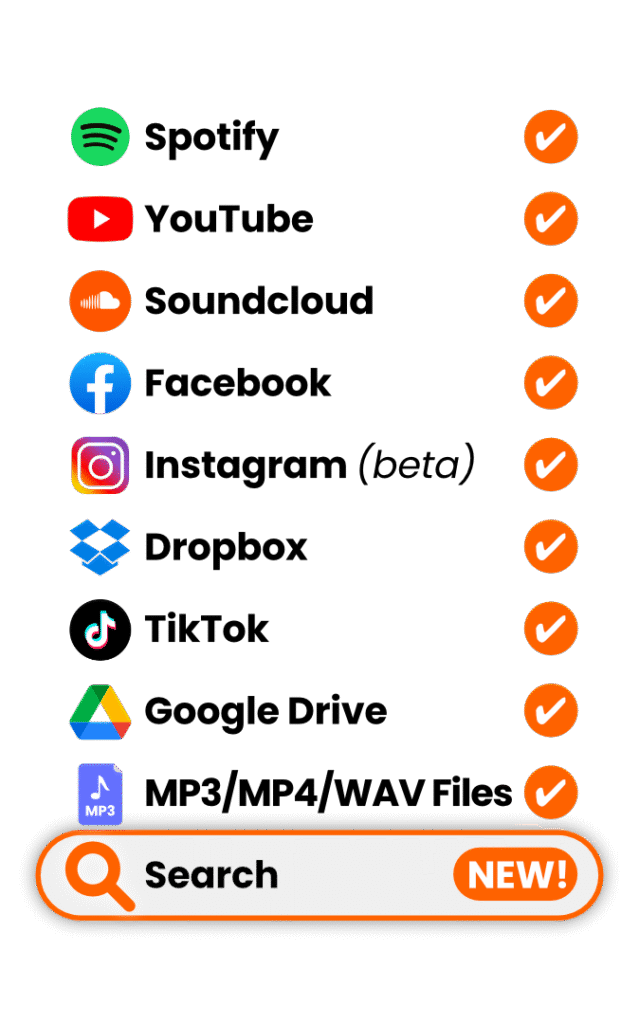
In addition to YouTube, SoundCloud, Spotify, MP3 and WAV files, we now support:

  • Facebook videos & Reels
  • TikTok videos
  • Google Drive audio files
  • Dropbox audio files

That means more flexibility, fewer workarounds, and faster quoting.


How It Works

No matter where your music is hosted, the process is simple:

1. Copy the link to your song

Each platform has a slightly different way of sharing links (see below).

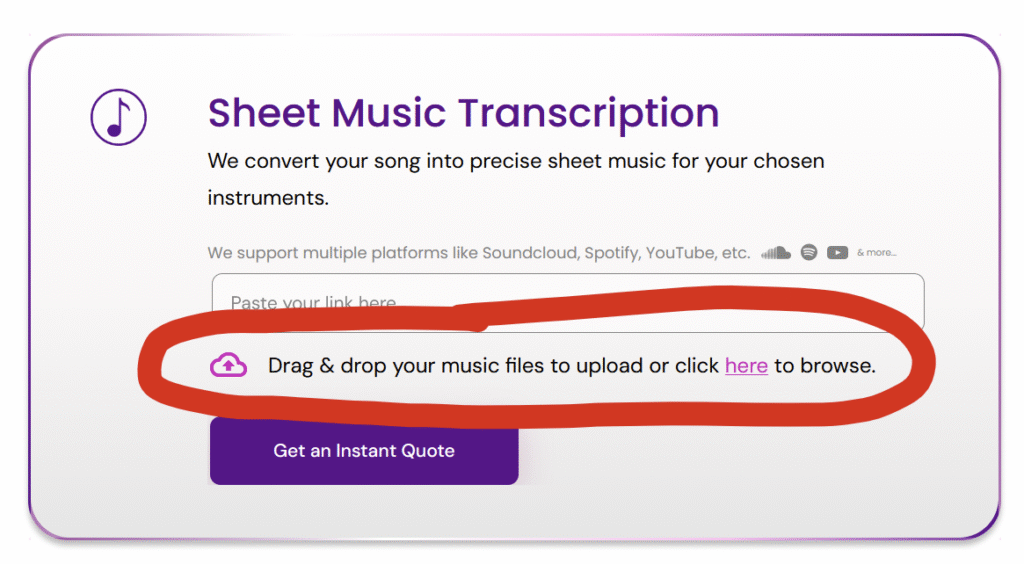
2. Paste the link into our Instant Quote tool

Head to the homepage and paste the link into the quote box.

3. Tell us what you need

Select instrumentation, difficulty level, format (score, parts, MIDI, etc.), and any additional requirements.

4. Check out

You’ll receive professionally engraved sheet music, delivered in as little as 2 days with rush delivery.

Every order includes:

  • Clean, publication-quality notation
  • Clear layout optimised for performance
  • Revisions if anything needs tweaking
  • Direct communication with real musicians

Platform-Specific Instructions

Below are the supported sources and how to grab the correct link for each.

🎬 Facebook Video or Reel

How to copy the link:

  • Open the video.
  • Click the three dots (…)
  • Select Copy link

Paste this into the Instant Quote tool.

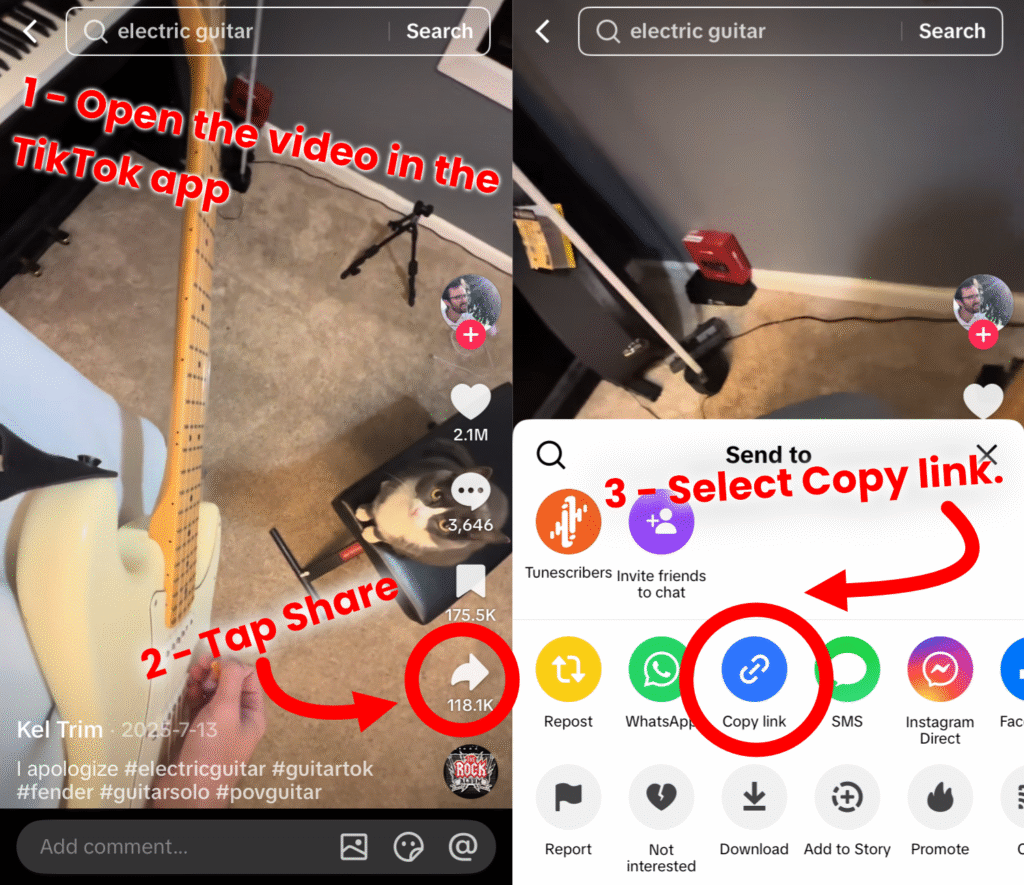
🎵 TikTok

How to copy the link:

  • Open the TikTok video.
  • Tap Share
  • Select Copy link

Paste the copied URL into our quote tool.

☁️ Google Drive (Audio Files Only)

You can now upload audio to Google Drive and use the share link.

Important:
The file must:

  • Be an audio file (MP3, WAV, etc.)
  • Have permissions set to “Anyone with the link can view”

How to get the correct link:

  • Right-click the file.
  • Click Get link
  • Change access to Anyone with the link
  • Click Copy link

Then paste it into our Instant Quote tool.

📦 Dropbox (Audio Files Only)

Dropbox links are also supported.

Important:
The file must:

  • Be an audio file (MP3, WAV, etc.)
  • Have permissions set to “Anyone with the link can view”

How to get the link:

  • Hover over the file.
  • Click Share
  • Select Copy link
  • Ensure link settings allow access without login.

Paste the link into the quote tool.


Previously Supported Sources

We continue to support:

  • YouTube
  • SoundCloud
  • Spotify
  • Direct MP3 upload
  • Direct WAV upload

If you can copy a link to it, there’s a good chance our quote tool can now handle it.


Why This Matters

Many customers discover music on social platforms first—not traditional streaming services. By supporting Facebook and TikTok links directly, we remove extra steps and make it easier to get started.

For original compositions, rehearsal recordings, demos, or live takes stored in the cloud, Drive and Dropbox support means no more downloading and re-uploading files.

Faster quoting. Fewer barriers. More music turned into notation.


Ready to Get Started?

Head to the homepage, paste your link into the Instant Quote tool, and see your price instantly.

Your custom sheet music could be in your inbox in as little as 48 hours.

Categories
testing category

What Is a Flexible Ensemble? (And Why We’re Giving You One for Free This Thanksgiving)

If you’ve spent any time arranging or directing music for community groups, you’ve probably run into this problem:

You never get the same instrumentation twice.

One week it’s three flutes, a viola, and an enthusiastic clarinettist. The next week it’s a trumpet, two saxes, a ukulele, and someone who has just taken up the oboe.

Traditional scoring doesn’t cope well with this kind of glorious chaos.

Flexible ensembles do.

As part of our Thanksgiving giveaway this month, we’re sharing a brand-new flexible ensemble arrangement of ‘Tis The Gift To Be Simple—free to download, and playable by almost any combination of instruments. More on that below.

But first, if you’ve never worked with flexible scoring before, here’s what it is, why it’s increasingly popular, and how one UK music charity has built an entire community around it.


What Flexible Ensembles Actually Are

At the core of the format is a simple idea:

Each musical line is supplied in multiple transpositions and clefs so almost any instrument can play any part.

For example, Part 1 (usually the melody) might be available as:

  • Treble C – flute, violin, oboe…
  • Treble Bb – trumpet, clarinet, tenor sax…
  • Treble Eb – alto sax…
  • Bass clef – low brass, cello…
The same melody shown in several transpositions.

Multiply that across five parts (plus accompaniment), and you suddenly have a format that works whether you have five players or fifty—and no matter who walks through the door each week.


Why Flexible Ensembles Exist: Speed, Inclusion, and Real-World Practicality

When Reuben and Rob launched The Misfits Music Institute, they needed an ensemble format that didn’t require a perfectly balanced orchestra before they could start.

“We wanted to get an ensemble together quite quickly,” Reuben told us, “and a flexible ensemble format lets you invite any musician, with any instrument.”

It solves a problem many community directors face: you can’t choose who turns up. Rather than writing for a fixed lineup, flexible scoring turns that unpredictability into a feature.

A headshot of Reuben Penny, Co-founder and Music Director of Misfits Music Institute, along with a a quote "the sound can change every week or every concert... letting go of the rigidity of fixed parts can be quite liberating."

Reuben describes the weekly sound-world of a flexible ensemble as something to embrace:

“I have to accept that the sound can change every week or every concert—and I’ve grown to really enjoy that. Letting go of the rigidity of fixed parts can be quite liberating.”

For groups where the instrumentation ebbs and flows, flexible parts keep rehearsals meaningful and performances musically satisfying.


The Misfits’ Twist: Parts Written by Ability Level

Most flexible ensembles sort parts by register or musical role. The Misfits do something different—and really smart.

Their arrangements use three difficulty levels, not three pitch ranges:

  • Part 1 – advanced players
  • Part 2 – intermediate musicians
  • Part 3 – beginners or returners

This lets beginners sit alongside professionals without anyone feeling out of place.

Over time, players often “graduate” between parts. Reuben described one member who joined late in life, confidently played Part 3, began taking lessons using Misfits material, moved into Part 2, and eventually into Part 1:

“It was inspiring to watch someone go from a mild interest to someone who practices regularly and plays in different ensembles. The format made that pathway possible.”


What You Gain (and What You Give Up)

Flexible ensembles work across almost any genre, but they naturally simplify textures.

Reuben puts it plainly: you’re not going to replicate every nuance of a sprawling orchestral score. However, that’s rarely the point.

“You’ll always lose some of the detail, but you can still capture the spirit—and you open the door for people to play music they might never otherwise get to play.”

And that is where the format shines: accessibility, creativity, and the thrill of hearing what a piece becomes when arranged for the musicians actually in the room.


Why Tis The Gift To Be Simple Works So Well in This Format

Folk music lives through variation—no two performances are the same—so flexible scoring feels completely natural here.

Reuben summed it up beautifully:

“Folk music is by nature quite flexible… having a flexible arrangement of it can be really exciting.”

If you’re directing a group, the best mindset is openness. Embrace unexpected colours, textures, and balances. They’re not flaws; they’re part of the charm.


Spotlight on The Misfits Music Institute

A community ensemble comprising of bass clarinet, trombone, accordion, ukulele, alto sax, violin, flute, clarinet and bass guitar.

The Misfits Music Institute
South Birmingham & the Black Country, UK

The Misfits are a community music charity dedicated to bringing people together through accessible, joyful music-making. They’ve been active since 2018, and their message is simple:

“The music is secondary—as long as people are having fun and meeting new people, that’s what we aim to achieve.”

Their flexible ensemble model embodies that ethos, and we’re proud to highlight their work. Learn more at their website or social channels if you’d like to explore their projects or support their mission:

https://misfitsmusic.org.uk

https://www.instagram.com/misfits_music_institute


Download Your Free Flexible Ensemble Arrangement

To celebrate Thanksgiving—and to follow up this month’s piano/vocal giveaway—we’ve created a flexible ensemble arrangement of ‘Tis The Gift To Be Simple, free for all Tunescribers customers.

It includes:

  • 5 parts, each available in multiple transpositions and clefs
  • An optional accompaniment part
  • A format playable by almost any group—duets, bands, school ensembles, community groups, or mixed collections of whoever turns up on the day

👉 Download the arrangement here—free


Earn $25 in Tunescribers Reward Points

Get $25 FREE Credit - read on below!

We’d love to hear what your version sounds like.

If you or your ensemble record themselves playing the arrangement—solo, duet, full flexible group, anything—and tag @tunescribers on social media, we’ll credit your account with:

🎁 $25 in Tunescribers reward points
(usable as credit on any future custom sheet music order)

Have fun with it, and feel free to experiment.

That’s the heart of flexible ensembles—and of ‘Tis The Gift To Be Simple itself.

Categories
testing category

Tunescribers Contributes Insights to Research Behind A Music Transcription Method

We’re delighted to share that Tunescribers was consulted as part of the supplementary research for A Music Transcription Method: Notating Recorded Music by Ear, a new book by Andreas Häberlin published in August 2025.

Book Cover of A Music Transcription Method, by Andreas Häberlin
A Music Transcription Method, by Andreas Häberlin

While the main text of the book was already complete, Häberlin sought additional real-world perspectives from professional transcribers for the online resource materials accompanying the release, and we were proud to be among those invited.

The book itself offers a comprehensive framework for learning how to transcribe recorded music by ear, covering everything from analytical listening and workflow setup to notation decisions and industry applications. It’s a valuable guide for anyone studying or working in arranging, orchestration, or music preparation.

As part of the additional research, several members of our team shared their personal experiences and challenges from years of professional transcription work. Here are just a few of their insights:


Simon, Bass & Keyboard Transcriber

“Learning to hear underneath the most prominent elements – to capture background textures and inner parts – was one of my biggest hurdles. Over time, I learned to treat entire chords as a single sound object.”

Simon, Bass & Keyboard

Joanne, Piano Transcriber

“Capturing irregular rhythms and subtle tempo shifts takes a deep understanding of rhythmic feel. Balancing accuracy with readability is always an ongoing challenge.”

Joanne, Piano

Manuel, Guitar Transcriber

“You have to use your notation software as well as your instrument. Mastering both is essential for efficiency — especially if you want to make a living from transcribing.”

Manuel, Guitar

Leo, Guitar Transcriber & QA

“Formalising my work with good presentation and clarity was a major turning point. Accuracy is only half the job — presentation makes it professional.”

Leo, Guitar


These reflections, along with dozens of others from our international team, offered a glimpse into the day-to-day realities of professional transcription, from mastering complex harmonies and time signatures to navigating software and maintaining healthy listening habits.

At Tunescribers, we’re proud to see music transcription gaining the academic and professional recognition it deserves. Resources like Häberlin’s A Music Transcription Method help bridge the gap between education and industry — something we’re passionate about every day.


About the Book
A Music Transcription Method: Notating Recorded Music by Ear
By Andreas Häberlin (Routledge, 2025)
Available in print and eBook formats.

Categories
testing category

One Year Running a Custom Sheet Music Business

Hi there, I’m Sam, and today is my Tunescribers birthday.

On 15 August 2025, it is exactly one year since I officially took over as Owner and Director of Tunescribers. It has been a year of challenges, learning, and incredible music-making, and I am both proud and grateful to still be here, working with so many talented people and serving our wonderful customers.


How I Got Here

I first joined Tunescribers back in 2017 as a part-time transcriber. At the time, I was a working freelance musician; I would do solo piano arrangements in the quiet moments between students, and work on huge wind band scores while sitting in the passenger seat of the band van, travelling to gigs.

Sam, playing accordion back in the touring days.
A younger Sam, on tour

I never imagined that seven years later I would be offered the opportunity to purchase the business and put my own stamp on it. 

Over the past twelve months we have transcribed more than 175 hours of music, covering everything from intimate solo pieces to large ensemble arrangements. Along the way we have also reached some important milestones.


Our Biggest Milestones This Year

Our First Tunescribers Arranging Competition

Tunescribers Arranging Competition 2025

Earlier this year, we ran our very first arranging competition. Entrants were given a public domain melody and a creative challenge: to produce a short piano arrangement. The level of talent on display was outstanding, and it was inspiring to see so many creative approaches. You can see the shortlist here.

A Brand New Website

Before and after Tunescribers website redesign

When I took over, our old website was slow, difficult to update, and weighed down by years of technical debt. Over the past year we rethought almost every aspect of it. The result is a faster, cleaner, and far more user-friendly site that better showcases our custom sheet music services.

A Whole New Look

New Tunescribers logo designed in 2025 rebrand

Alongside the website rebuild, we worked on a complete rebrand for Tunescribers. This included a new visual identity and a fresh logo, beautifully designed by the talented Sarah Aanchal.

Our New Browser Extension

Tunescribers browser extension for custom sheet music quotes

Most recently, we launched the Tunescribers browser extension, available for Google Chrome, Mozilla Firefox, and Microsoft Edge. It lets users quickly request quotes for sheet music transcription, arrangement, and backing tracks while browsing the web. It is free to use, and you learn more about it here. If you already use it, please consider leaving us a review in your browser’s add-on store.


The People Behind the Music

Tunescribers has always been a team effort. From our skilled musicians to our brilliant developers and designers at Rubico, many people contribute to making your sheet music projects a success.

I would especially like to thank:

  • Leo Downs and Danisa Alesandroni, our crack QA team, who check over each project in detail and constantly push us towards higher musical standards.
  • Ignacio Quiroz, our social media wizard, who has grown our channels from almost zero to many thousands of followers in less than a year.
  • Jimmy Abraham, project lead for the website rebuild, whose careful planning kept everything on track.
  • Sarah Aanchal, lead designer, for our stunning new logo and brand identity.
  • Jeff Pepper, founder of Tunescribers, for his continued support and valuable advice throughout the year.

What’s Next for Tunescribers

Our focus for the year ahead is simple: do what we already do, but bigger and better. We want to help more musicians, collaborate on more inspiring projects, and continue to deliver the highest quality custom sheet music services possible.

If we have worked on a project for you over the past year, from a first dance arrangement to a full musical score, we would love to hear about your experience. You can leave us a review on:


A Thank You and a Gift for You

To celebrate this first year, I have set up a special one-day-only discount, limited to the first 20 orders. Use code SAMSFIRSTYEAR to get 25% off your next sheet music transcription, arrangement, or backing track. This code is valid for only 20 uses, on 15 August 2025.

Thank you for reading, and for being part of the Tunescribers journey. Here is to many more years of making music together.

Sam from Tunescribers

Categories
testing category

What Are Chord Symbols, and How to Get Them Your Way at Tunescribers

If you’ve ever played from sheet music and seen something like Cmaj7, F#m, or G7 above the staff, you’ve encountered chord symbols. These little annotations are small in size but huge in function. They tell you the harmonic structure of the music and guide players (especially guitarists, pianists, and arrangers) on what chords to play.

At Tunescribers, chord symbols have always been part of the custom sheet music experience by default. But here’s the thing: many customers didn’t know that!


Why Chord Symbols Matter

Chord symbols serve a few key purposes:

  • They let rhythm section players improvise: Guitarists and pianists can comp without reading every note.
  • They help with quick harmonization: If you’re writing a horn arrangement, for example, you can build voicings directly from the chords.
  • They simplify music for learners: Beginners can focus on chord shapes rather than notation.
  • They’re essential for lead sheets: When the melody and chords are the whole song.

What We’ve Changed (and Why)

To help clarify things, we’ve added a new question to our order form asking for your chord symbol preference:

Chord text (default)
🎸 Chord text + guitar diagrams
No chord symbols

We were already including chord symbols by default, but many customers didn’t realise this—so we added this question to make the option more visible and give you more control.


When Should You Use Chord Diagrams?

Guitar chord diagrams are perfect when:

  • You’re arranging for beginner or intermediate guitarists
  • You’re creating educational materials or songbooks
  • You want to make performance easier at a glance—especially for visual learners

They’re not ideal if you’re writing for piano, ensemble, or professional musicians who may find them unnecessary or cluttered.


What Happens If You Choose “No Chords”?

We’ll omit all chord symbols and diagrams from your sheet music—great for projects where harmony is already notated in full (e.g. orchestral scores or classical arrangements), or where you simply don’t want them.


Small Change, Big Impact

This minor update makes it easier to:

  • Know what you’re getting
  • Customize your chart exactly how you want it
  • Avoid back-and-forth emails

We’re always working to improve the ordering process, and small tweaks like this are all part of making your custom sheet music as smooth as possible.


📥 Want Custom Sheet Music Your Way?

Whether you’re a guitarist, composer, teacher, or just someone chasing down that perfect lead sheet—we’ve got you covered.

👉 Place your order now and tell us exactly how you want your chords!

Categories
testing category

New Tunescribers Browser Extension

🎉 New! The Tunescribers Quick Quote Browser Extension Is Here

If you’ve ever thought “I wish I could get a sheet music quote instantly for this song I’m listening to” — we’ve got great news.

The Tunescribers Quick Quote extension is now available for Chrome and Firefox, and Microsoft Edge.


What Is It?

The Quick Quote extension makes it ridiculously easy to request a custom sheet music quote from any song page — right from your browser. Just click the icon and you’ll be taken to our quote form with the URL pre-filled.

Supported platforms: YouTube, Spotify, and SoundCloud.


How It Works

  • Install the extension:
    Follow the links below to get the extension for your browser:


  • Click the icon in your browser:
    Browser icon location

  • You’re taken to our quote form with the link already filled in:
    Tunescribers Quote Form

Why Use It?

  • Faster quotes – no need to copy/paste
  • Fewer clicks – just one tap from a track to a quote
  • Better accuracy – we grab the exact URL for you

It’s perfect for musicians, teachers, students, and anyone who regularly needs custom sheet music.


👉 Ready to Try It?

Click below to install the extension in your browser and start your next project faster than ever.

FAQs

Do I need the extension to get a quote?

Nope! You can still get a quote the usual way by visiting our order form.
The extension is just a handy shortcut — it speeds up the process by automatically grabbing the link to the music you’re viewing.

Can I use it on my phone or tablet?

Not yet — the Tunescribers Quick Quote extension is currently available for desktop browsers only (Chrome, Firefox, and soon Microsoft Edge).
If you’re on mobile, we recommend bookmarking our order form for quick access.

How do I install it?

It only takes a second:

Is it free?

Yes! The extension is completely free to install and use.

Does the extension collect or read any of my data?

No. The extension simply detects the page URL when you click the Tunescribers icon and passes that to our quote tool.
It doesn’t track you, store your info, or access anything else in your browser.

Can I just order sheet music?

Tunescribers offers more than just sheet music!
With the Quick Quote extension, you can request any of our services — including custom arrangements, transcriptions, backing tracks, and more.

The extension isn’t working — what should I do?

Most issues come from trying to use the extension on the wrong type of page. Here’s how to make sure you’re on the right one:

  • YouTube: Open the specific video. Don’t use a playlist or search results page.
  • Spotify: Make sure you’re on the song’s individual track page (click the track title so it shows its own page/URL).
  • SoundCloud: Navigate to the single track’s page — not a playlist, album, or artist profile.

Once you’re on the correct page, click the Tunescribers icon in your browser toolbar. You should be redirected to our quote form with the link pre-filled.

What sites does it work on?

Right now, it works with:

  • YouTube
  • Spotify (web player)
  • SoundCloud

We’re adding support for more platforms over time.

What happens when I click the extension?

You’ll be instantly redirected to our quote form, with the music link already filled in. From there, you can adjust your preferences and place your order as usual.

Categories
testing category

Welcome to the New Tunescribers – Fresh Look, New Features

Our biggest update ever is here!

We’re excited to unveil the brand new Tunescribers website – rebuilt from the ground up to give you a faster, smoother, and more intuitive experience.

Here’s what’s new:

A Whole New Look

Our old and new logos, compared

We’ve updated our design, added a fresh logo, and made everything easier on the eyes (and fingers). It’s the Tunescribers you know – just sharper and sleeker.

Faster and more reliable

Screenshot of our new homepage

Whether you’re placing an order or browsing your project history, the new site is lightning quick and more stable than ever.

Smarter ordering

Screenshot of a section of our new order form

Not sure what to select? Our streamlined order form now includes visual cues to help explain the options – no guesswork needed.

Introducing Transcription Videos

Our new Transcription Video service

Want your score synced to a video, like the content we share on YouTube, Instagram, or TikTok? Now you can order exactly that. Perfect for performers, educators, and creators.

Massively improved Rewards Program

Updated Rewards Program, points = $

You can now redeem your points for credit towards custom work – for the first time ever. Your loyalty just got a lot more rewarding.

Goodbye Karaoke Service

As previously announced, we’ve retired our karaoke offering to focus on what we do best: notation, arrangement, and transcription.

And dozens of other tweaks and fixes

Smaller things you might not notice right away, but we promise you’ll feel the difference.

Thanks for being part of the Tunescribers community – we can’t wait to hear what you think of the new experience.

The Tunescribers Team

Categories
testing category

Tunescribers Arranging Competition 2025 – Winners Announced!


🏆 Tunescribers Arranging Competition 2025 – Winners Announced! 🏆

After weeks of listening, deliberating, and celebrating the creativity of arrangers from around the world, we’re thrilled to announce the winners of the Tunescribers Arranging Competition 2025!

🥇 1st Place: Kurt Bestor

Prize: $500 cash and a NotePerformer license

Judges’ comments:

  • Martin Keary (Tantacrul): Intriguing opening and very nice ending… very consistent and satisfying
  • Ben Rauhala: Stunning to play, stunning to hear. Beautiful without being difficult. Very clearly and expressively notated. Bonus points for the “like a whisper” notation at the end. Loved this!
  • Peter Davison: Beautiful. Really very very musical, and just works in its simplest form. Nothing overtly complicated, just very considered and musical
  • Joe Beighton: Beautifully simple. Very cohesive, unified and well assembled. I’m a big fan of the harmonisation… unpretentiously stunning arrangement


🥈 2nd Place: Dan Wanamaker

Prize: $100 Tunescribers transcription credit and a perpetual Cantai license

Judges’ comments:

  • Martin Keary (Tantacrul): Impressive harmonic creativity. Consistent, with a refreshing take on the mood. Very pianistic, very good presentation and engraving.
  • Ben Rauhala: Beautiful, particularly in the second half. Doesn’t feel as much like the original song often-times, but I found it lovely.
  • Peter Davison: This is very clever… clearly a very skilled musician here. It’s bitonal, but very very well thought out.
  • Joe Beighton: A great take on the brief. The harmonisation is really interesting if a little incohesive at times. The furieux section feels a bit out of place, but rhythmically and voicing-wise it’s a brilliant bit of music.


🥉 3rd Place: Fred Grigg

Prize: $50 Tunescribers transcription credit and a perpetual Graphical MIDI Tools license

Judges’ comments:

  • Martin Keary (Tantacrul): Rhythmically strong. A player could have fun with this and really make it shine.
  • Ben Rauhala: Star quality in spades. A bold, well-notated re-interpretation. While not the most sight-readable of all difficulty-wise, it’s written out clearly to be achievable with practice.
  • Joe Beighton: It’s exciting to hear such a different take… a brilliant piece and exciting to listen to/play.


🎖 Honourable Mentions

  • Georgia Seddon
  • David Perkins


🗳 Audience Favourite: David Perkins

Prize: A professionally recorded piano performance video of the arrangement (subject to playability)


🙏 Thank You!

A huge thank you to all of the talented entrants who made this competition so special. We were blown away by your creativity, skill, and musicality.

Thank you to our esteemed panel of judges – Martin Keary (Tantacrul), Ben Rauhala, Peter Davison, and Joe Beighton – for lending their expertise and thoughtful feedback.

And of course, thank you to our generous sponsors – NotePerformer, Cantai, and Graphical MIDI Tools – for supporting new music and making these prizes possible!

We can’t wait to do this again – see you next time!


Categories
testing category

The Audience Vote is Now Open!


Tunescribers Arranging Competition 2025 – Audience Vote Now Open!


🏆 Winners Announced!

The results are in! Discover the winning arrangements from the Tunescribers Arranging Competition 2025.

🎉 See the Winners 🎉

Vote for Your Favorite Arrangement!

The judges have selected their shortlist, and now the power is in your hands! The Audience Favourite prize will be awarded to the shortlisted entry that receives the most public votes.

How to Vote

🔹 Watch the entries: We’ve created a YouTube playlist featuring all shortlisted arrangements. You can listen to them all here.

🔹 Cast your vote: To vote, you must both like the post featuring your chosen arrangement and comment “vote” on it. Both actions are required for your vote to count.

🔹 One vote per person per platform: You can vote once on each platform (YouTube, Instagram, Facebook, and TikTok).

Where to Vote

📺 YouTube Playlist: Watch and listen here

📷 Instagram: Watch and listen here

📘 Facebook: Watch and listen here

🎵 TikTok: Watch and listen here

Free Sheet Music and Exclusive Discount Code for Voters!

As a thank-you for participating, everyone who votes will receive a free piano arrangement of “Moonlight Serenade” by Glenn Miller. Your free song will be sent to you via DM. We’ll also send you an exclusive discount code to use on any of our custom music services. If you don’t receive these within 48 hours of your vote, please email us at info@tunescribers.com.

Voting Deadline

Make sure to cast your vote by April 13, 2025. The winner will be announced on April 14, 2025.

Stay Updated

Follow us on social media for the latest updates:

📷 Instagram: @tunescribers

▶ YouTube: @tunescribers

🎵 TikTok: @tunescribers

📘 Facebook: Tunescribers

Let’s celebrate the creativity of our talented arrangers—happy voting! 🎹🎶

Categories
testing category

Arranging Competition Shortlist


Tunescribers Arranging Competition 2025 – Shortlist Announced!


🏆 Winners Announced!

The results are in! Discover the winning arrangements from the Tunescribers Arranging Competition 2025.

🎉 See the Winners 🎉

🎉 Announcing the Shortlist for the Tunescribers Arranging Competition 2025! 🎉

We were blown away by the creativity and talent in this year’s competition. After much deliberation, our judges have selected the following eight entries for the shortlist (listed in no particular order):

  • Dominic Baldwin
  • Georgia Seddon
  • Fred Grigg
  • John Houston
  • Dan Wanamaker
  • Kurt Bestor
  • David Perkins
  • MoAli Voshagh

Congratulations to all! If you didn’t make the shortlist, don’t be discouraged—judging was tough, and it all comes down to individual tastes on the day. Every entry had something special, and we encourage you to keep arranging!

🏅 Social Media Badges 🏅

We’ve created badges for you to share on social media! If you made the shortlist, find your personalized badge below. If you didn’t quite make it this time, we’ve also created a badge to celebrate your participation.

Dominic Baldwin Badge
Georgia Seddon Badge
Fred Grigg Badge
John Houston Badge
Dan Wanamaker Badge
Kurt Bestor Badge
David Perkins Badge
MoAli Voshagh Badge
Just Missed Out Badge