Note: links in this article may be affiliate links.
In the digital age, creating, sharing, and learning music has never been easier, especially with various online music notation tools available right in your web browser. Musicians, educators, and students have a wealth of options to choose from.
Today, we at Tunescribers are excited to compare three popular online music notation platforms: Noteflight, Flat.io, and Soundslice. We’ve tested these tools to help you find the best fit for your needs.
Plus, all Tunescribers transcriptions come with MusicXML files, ensuring seamless import into these products.
Noteflight: Comprehensive and User-Friendly
Overview: Noteflight is a powerful online music notation tool that allows users to create, share, and collaborate on sheet music directly in their browser. We found its user-friendly interface and extensive feature set particularly impressive.

Key Features:
- ● Ease of Use: Noteflight‘s intuitive interface makes it accessible for users of all skill levels.
- ● Collaboration: Real-time sharing and collaboration make it perfect for group projects and educational settings.
- ● Playback and Recording: High-quality playback with realistic instrument sounds and the ability to record audio directly into your scores.
- ● Hal Leonard Partnership: Unique to Noteflight, this partnership allows users to sell their arrangements legally, an invaluable feature for composers and arrangers. These arrangements can be sold directly on Noteflight’s Marketplace, or via SheetMusicDirect and SheetMusicPlus.
- ● Library: Access to a vast library of user-created scores.
- ● Compatibility: Noteflight supports MusicXML files, ensuring easy import and export with other music notation software.
Pros:
- ● Rich set of features for composing and arranging music.
- ● Strong community and sharing capabilities.
- ● Affordable subscription options, including a free version with basic features.
- ● Legal sales of copyrighted arrangements through Hal Leonard.
Cons:
- ● Some advanced features are locked behind the premium subscription.
- ● Interface can feel cluttered for beginners.
Best For:
- ● Composers and arrangers looking for a comprehensive tool.
- ● Music educators and students who need collaboration features.
- ● Musicians who want to access a large library of pre-existing scores.
Flat.io: Collaborative and Educational
Overview: Flat.io is an online music notation platform designed with collaboration and education in mind. It integrates seamlessly with various educational tools, making it a favorite among teachers and students. We enjoyed how it operates entirely within the browser, like the other tools in this comparison.
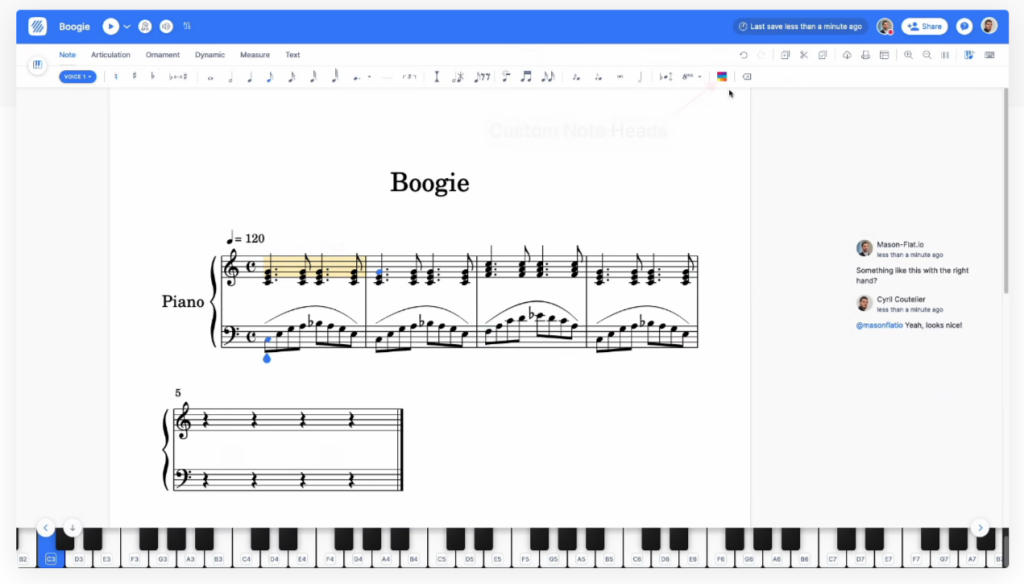
Key Features:
- ● Real-Time Collaboration: Multiple users can work on the same score simultaneously, ideal for classroom settings. It’s a lot like Google Docs, but for sheet music!
- ● Integration: Connects with Google Classroom, Microsoft Teams, and other educational platforms.
- ● Interactive Learning: Tools for creating interactive music theory exercises and assignments.
- ● Accessibility: Supports various input methods, including MIDI and keyboard shortcuts.
- ● Compatibility: Flat.io supports MusicXML files, facilitating easy exchange with other notation software.
Pros:
- ● Strong emphasis on collaboration and educational tools.
- ● Easy integration with educational software.
- ● Simple and clean interface suitable for beginners.
Cons:
- ● Limited features in the free version.
- ● Some advanced notation features may be lacking compared to competitors.
Best For:
- ● Music educators and students who need seamless integration with classroom tools.
- ● Beginners looking for an easy-to-use notation platform.
- ● Groups and ensembles that require real-time collaboration.
Soundslice: Interactive and Innovative
Overview: Soundslice is a unique platform that combines traditional music notation with interactive video and audio. It’s particularly popular among musicians who learn by ear and those looking to transcribe music from recordings. We found Soundslice‘s browser-based functionality to be highly versatile.
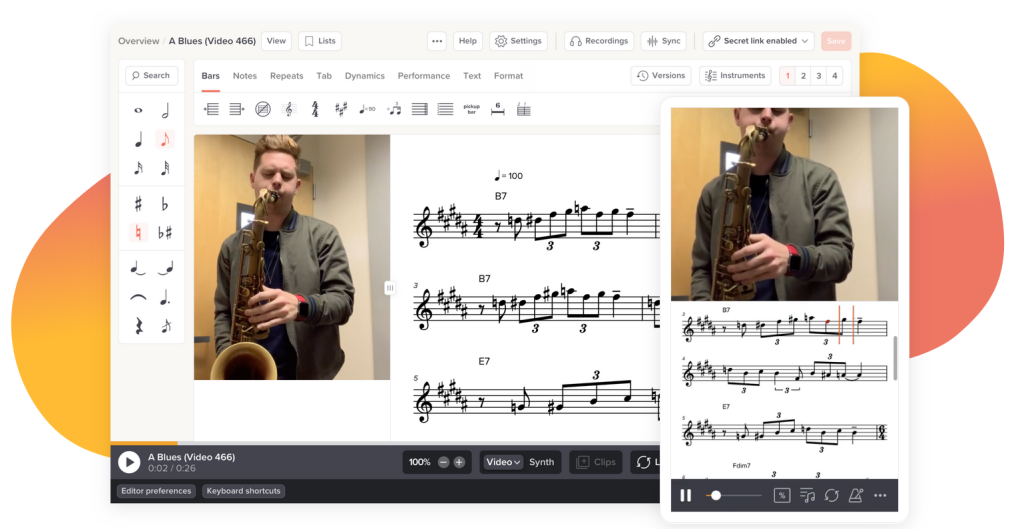
Key Features:
- ● Interactive Scores: Syncs notation with video and audio for an immersive learning experience.
- ● Transcription Tools: Slow down, loop, and annotate video and audio, making transcription easier.
- ● Community Content: Access to a wealth of user-generated transcriptions and lessons.
- ● Mobile-Friendly: Designed to work seamlessly on both desktop and mobile devices.
- ● Compatibility: Soundslice supports MusicXML files, allowing for easy integration with other notation software.
Pros:
- ● Innovative approach to learning and transcribing music.
- ● Excellent for musicians who learn by watching and listening.
- ● Strong community and extensive library of transcriptions.
Cons:
- ● Not as feature-rich for traditional notation as some competitors.
- ● Higher learning curve for users unfamiliar with video and audio integration.
Best For:
- ● Musicians who prefer to learn by ear and through visual aids.
- ● Those who frequently transcribe music from recordings.
- ● Mobile users looking for a versatile platform that works on the go.
Conclusion: Choosing the Right Tool
Choosing the right music notation tool depends on your specific needs and preferences:
- ● Noteflight is ideal for those seeking a comprehensive, feature-rich platform with strong collaboration capabilities and the ability to sell legal arrangements through Hal Leonard.
- ● Flat.io is perfect for educators and students who need an easy-to-use, collaborative tool that integrates with educational software.
- ● Soundslice stands out for musicians who learn visually and by ear, offering innovative features for transcription and interactive learning.
It’s important to note that while these tools are fantastic for many users, they may not offer the depth and power required by professional musicians, such as those working with Tunescribers. Professional notation software like Sibelius, Finale, or Dorico provides more advanced capabilities but comes with a steeper learning curve and higher cost.
For many musicians, educators, and students, the simplicity and accessibility of these browser-based tools are more than sufficient for their needs. They also all support MusicXML files, ensuring compatibility and ease of transfer between different platforms.
No matter which platform you choose, each of these tools offers unique benefits that can enhance your music creation, learning, and sharing experience. Explore their free versions, test out their features, and find the one that resonates best with your musical workflow.

 I’m Entering the Tunescribers Arranging Competition 2025



 AI music transcription tools leverage sophisticated algorithms to convert audio files into sheet music almost instantaneously. Some of the top AI transcription tools include:
 When accuracy, artistry, and a personalized touch are paramount, Tunescribers’ expert musicians offer an unparalleled service. Our team is dedicated to delivering high-quality transcriptions that not only meet but exceed your expectations.